
You can now launch a working website for the price of a $3.18 domain. What none of the AI tools do is check whether search engines can actually crawl, index, and rank the result.
ChatGPT plans the content, Claude writes the code, GitHub stores it, and Vercel deploys it for free. But AI-built websites fail in predictable ways: missing meta descriptions, duplicate title tags, preview URLs that get indexed, broken canonicals, and content that only appears after JavaScript runs. A deployment that looks perfect in your browser can still be invisible to Google.
This guide walks through a technical SEO audit built for low-cost, AI-assisted websites hosted on Vercel. Run it before launch, then repeat it after every significant deployment.
Website Development Before AI vs Now
Not long ago, launching even a simple website meant juggling hosting providers, hiring developers, and manually uploading files. Finding hosting alone was a project. You compared shared hosting plans, decoded bandwidth limits, and often got locked into multi-year contracts to get the advertised price. Deploying meant opening an FTP client and uploading files one folder at a time.
Hosting was only one piece. For most people, launching a complete website alone was close to impossible, because the job required a whole team:
| Role | What they handled | Now covered by |
|---|---|---|
| Strategist or planner | Site goals, audience, sitemap, page structure | ChatGPT, with human direction |
| Content writer | Page copy, headlines, calls to action | ChatGPT, with human editing |
| Web designer | Layouts, color, typography, mockups | Claude, guided by a design system |
| Front-end developer | HTML, CSS, JavaScript, responsive layouts | Claude |
| Hosting and server admin | Servers, SSL, uploads, uptime | Vercel |
| SEO specialist | Metadata, crawlability, indexing | Still needs a human audit |
| Task | Before AI | Today with AI and Vercel |
|---|---|---|
| Finding hosting | Shared hosting plans, contracts, hidden fees | Free tier, connected to GitHub in minutes |
| Server setup | cPanel, Apache, PHP versions by hand | Nothing to configure for supported projects |
| SSL certificate | Often a paid add-on, installed manually | HTTPS provisioned automatically |
| Deployment | FTP uploads, file by file | Automatic deploy on every push |
| Rolling back a mistake | Restore from a backup, if one existed | Revert a commit or roll back instantly |
| Typical upfront cost | Hundreds to thousands of dollars | $3.18 for a domain, plus optional AI plans |
| Time to launch | Weeks to months | Hours to days |
Before AI, a developer knew where the title tags and redirects lived because they wrote them by hand. Today, code arrives in seconds from a tool that does not check whether Google can index it. And a broken template on an auto-deploying site goes live everywhere, within minutes, on every push. Building is cheap. Verifying is the step people skip.
The $3.18 Stack and Where It Breaks
| Component | Tool | Common audit issue |
|---|---|---|
| Planning and content | ChatGPT | Generic copy, thin pages, overlapping keyword targets |
| Code | Claude | Missing metadata, multiple H1s, empty alt attributes |
| Repository | GitHub | Regressions that silently remove tags or pages |
| Hosting | Vercel | Indexed preview deployments, www and non-www duplicates |
| Domain | Registrar | DNS misconfiguration, broken HTTPS, redirect loops |
About the $3.18: it covers the domain only. GitHub and Vercel free tiers are subject to their current terms and usage limits, and AI tool costs depend on your plan.
1. Audit the Plan Before Any Code Exists
Most SEO problems start in planning, not code. Check ChatGPT's sitemap and drafts against these before handing anything to Claude:
- One intent per pageNo two pages competing for the same query.
- Unique metadata drafted in advanceA title tag and meta description for every page before the build.
- A clean URL structureShort, lowercase, hyphenated slugs.
- Specific contentNot generic filler a competitor could publish word for word.
2. Audit the AI-Generated Code
Claude writes functional code quickly, but functional is not the same as crawlable. Review every page template for:
- Title tags and meta descriptionsPresent, unique per page, and within typical display lengths.
- Heading hierarchyExactly one H1 per page, then a logical H2 and H3 structure.
- Image alt textDescriptive on meaningful images, empty only on decorative ones.
- Semantic HTMLReal
<nav>,<main>,<header>, and<footer>elements. - Crawlable internal linksStandard
<a href>links, not click handlers on buttons. - Structured dataValid JSON-LD, tested in Google's Rich Results Test.
Headings, copy, and links appear only after client-side scripts run. Googlebot may index a nearly empty page.
Content exists in the page source. Check with View Source, not just the rendered page.
3. Audit Every Change in GitHub
AI edits can remove things you never asked it to touch. A request to restyle the header can quietly delete the canonical tag in the same file. Before merging, review the diff for <title>, <meta name="description">, <link rel="canonical">, robots directives, redirect rules, and sitemap config.
Never commit API keys, passwords, or other secrets to a public repository.
4. Audit the Vercel Deployment
Preview deployments
Every branch can generate a public preview URL on a vercel.app subdomain. If these get crawled, Google sees duplicate copies of your site. Vercel adds an X-Robots-Tag: noindex header to preview deployments, but verify it in your browser's Network tab. Also confirm the production vercel.app URL redirects to your custom domain or carries a canonical pointing to it.
Root directory and build output
If the wrong directory is deployed, pages may return 404s or serve stale files. Confirm the Root Directory setting and read build logs for warnings, not just failures.
Redirects and status codes
Redirects in vercel.json or your framework config should use permanent 301 or 308 codes where intended. Test for chains, where one URL redirects to another that redirects again.
5. Audit the Domain and DNS Setup
Pick one
Root or www. Redirect the other permanently.
One hop
Every http URL reaches https in a single redirect.
Consistent
Canonicals, links, and sitemap use the same hostname.
Keep email
MX and TXT records survive the DNS changes.
6. Audit Crawlability and Indexability
- robots.txtLoads at
/robots.txt, blocks nothing important, and references your sitemap. - No stray noindexAI-generated templates sometimes ship with a development noindex left in place.
- XML sitemapLists only canonical, indexable URLs that return 200.
- Google Search ConsoleVerify the domain, submit the sitemap, and inspect key URLs.
- A full crawlCatch broken links, orphan pages, duplicate titles, and missing metadata at scale.
7. Audit Performance and Core Web Vitals
A fast host does not guarantee a fast page. AI-generated code often ships oversized images, unused libraries, and layout shifts.
Largest Contentful Paint
Compress and size hero images. Don't lazy-load the main above-the-fold image.
Cumulative Layout Shift
Set width and height on images and reserve space for embeds.
Interaction to Next Paint
Remove heavy scripts that delay responses to clicks and taps.
Case Study: Auditing remar.digital with SiteAuditLint
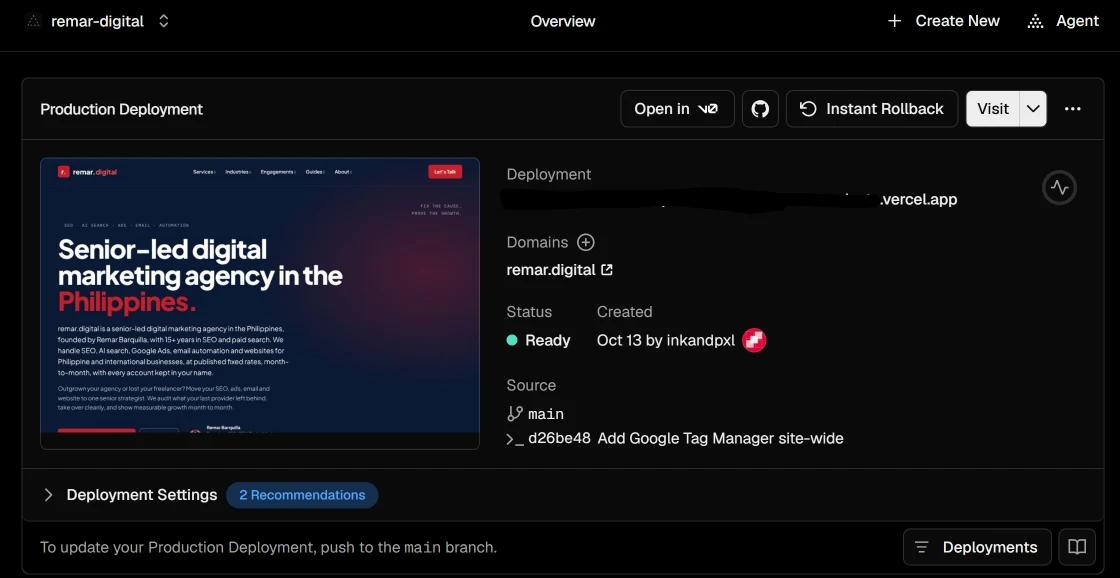
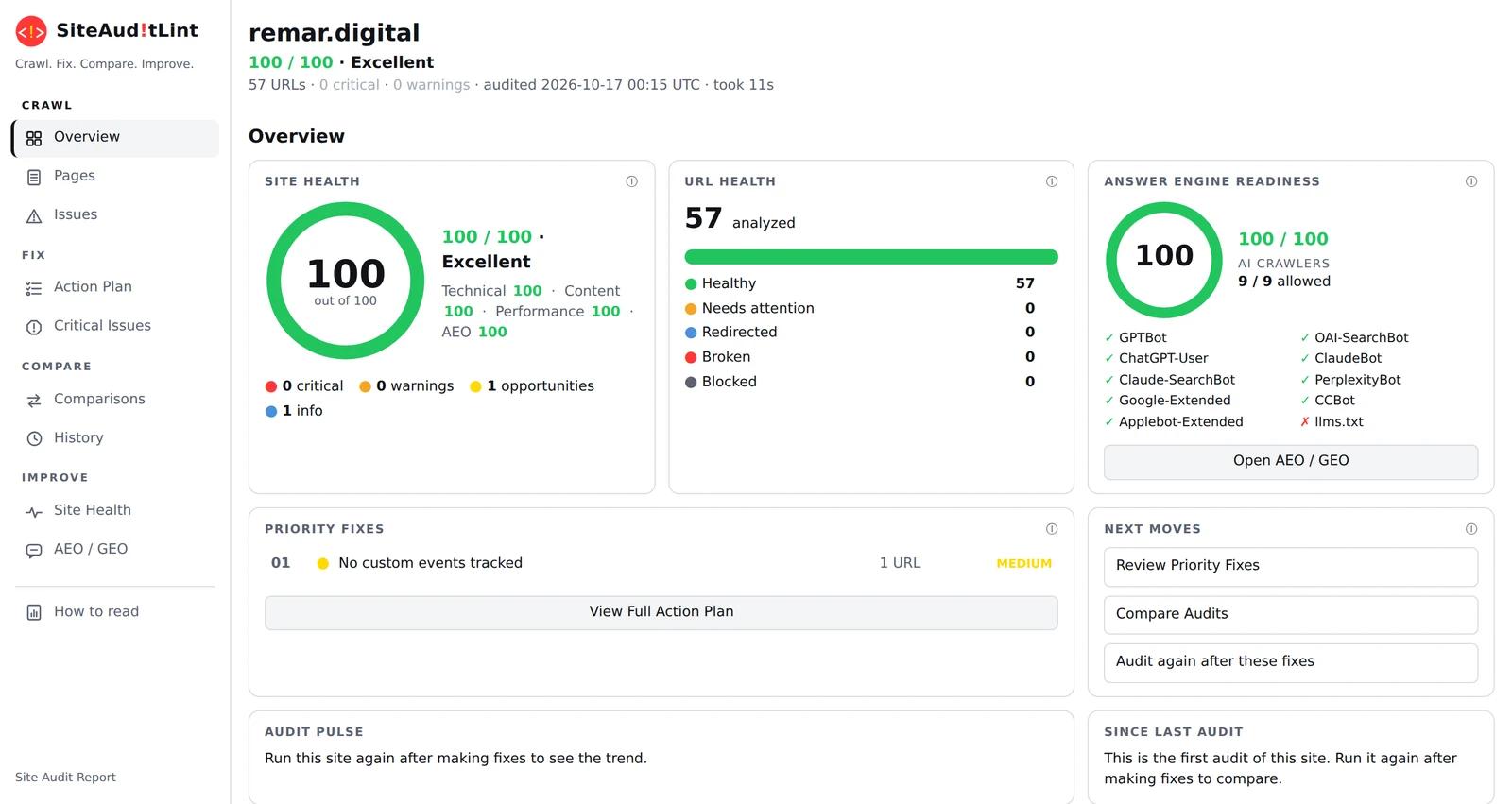
remar.digital was planned with ChatGPT, coded with Claude, stored in GitHub, deployed on Vercel, and runs on a domain bought from Namecheap for $3.18. We crawled it with SiteAuditLint on October 17, 2026.


| Audit area | What was checked | Result |
|---|---|---|
| Response codes | 2xx, 3xx, 4xx, 5xx | 57 of 57 returned 200 |
| Indexability | noindex, nofollow, robots.txt blocks | 0 non-indexable |
| Canonicals | Missing, empty, or pointing elsewhere | 57 self-referencing |
| Titles and descriptions | Missing, duplicate, length | 0 issues |
| Headings | Missing, multiple, duplicate H1 | 0 issues |
| Duplicate content | Exact and 85%+ near duplicates | 0 found |
| Images | Missing alt text | 0 missing |
| XML sitemap | Missing, non-200, orphaned URLs | All 57 included |
| Internal links | Orphans, depth over 4 clicks | All within 1 click |
| Structured data | Missing or invalid JSON-LD | Valid on all 57 |
| Security | HTTPS, mixed content, HSTS | All passed |
| Performance | Responses over 1,000 ms | 0 slow pages |
| AI crawlers | robots.txt access for 9 AI bots | 9 of 9 allowed |
| Custom events | GA4 events beyond page views | Opportunity |
| llms.txt | AI content map file | Not found |
What the audit still found
A perfect score does not mean nothing to fix. GTM was installed, but only page views were tracked, so the site couldn't show which pages produce leads. The fix is adding GA4 key events for the contact and free audit forms. The report also suggested publishing a short /llms.txt with a site summary and links. Neither issue would ever show up in a browser check.
A crawler only audits the domain you point it at. It won't tell you whether a vercel.app copy of your site is indexed, so pair the crawl with a site: search on your Vercel address.
Pre-Launch Technical SEO Checklist
Domain and hosting
- Custom domain loads over HTTPS with no certificate warnings
- Only one hostname resolves; the other redirects with a 301 or 308
- Preview and vercel.app URLs are noindexed or redirected
On-page
- Every page has a unique title tag and meta description
- Every page has exactly one H1
- Key content appears in the page source
- Images are compressed, sized, and have alt text
- Structured data validates without errors
Indexing
- Canonical tags point to the correct primary URL
- robots.txt allows important pages and references the sitemap
- No stray noindex tags or headers
- Sitemap lists only indexable 200-status URLs and is submitted in Search Console
- No broken links, redirect chains, or orphan pages
- No major Core Web Vitals problems on mobile
Re-Audit After Every Deployment
Every push to your production branch goes live within minutes, including any SEO regressions an AI edit introduced. Re-audit after changes to templates, navigation, metadata, redirects, framework versions, or rendering settings. These are the edits most likely to break crawlability across many URLs at once.