
A page can pass every hreflang syntax check and still belong to a broken hreflang cluster. That is why so many hreflang errors survive a "fix": the tags on each page look right, but the localized pages do not agree with each other.
Here is a common example. The English page lists https://example.com/fr/ as its French alternate. The French page lists itself as https://example.com/fr with no trailing slash, and canonicalizes to that version. Each page is valid on its own. Together, the return tag never matches, and Google may ignore the annotations for the whole cluster.
This guide shows how to fix hreflang tags with errors at the cluster level, not one page at a time.
How to Fix Hreflang Errors: The Short Answer
- Sort the errors by severity, so cluster-breaking problems come first.
- Map every localized page and the alternates it declares.
- Trace each alternate URL to its final destination and status code.
- Check that every alternate is the canonical, indexable version of its page.
- Confirm your HTML, sitemap and HTTP header annotations do not disagree.
- Validate language codes, region codes and the actual content language.
- Fix the template that produces the error, not each URL.
- Re-crawl and compare results to confirm the fix held.
Step 1: Sort Hreflang Errors by Severity
Not every hreflang warning carries the same weight. Most guides list errors as equals, and some contradict each other on whether self-references or x-default are required. A severity model settles that and tells you where to start.
| Severity | Errors | What happens |
|---|---|---|
| Breaks the cluster | Missing return tags, hreflang pointing to non-canonical URLs, alternates that 404, redirect, are noindexed or blocked in robots.txt, one URL assigned to two languages | Google may drop the annotations for some or all pages in the cluster |
| Weakens targeting | Wrong market code, missing x-default where users need a fallback, declared language that does not match the content, HTML and sitemap annotations that disagree | The right page may rank but the wrong version gets shown |
| Usually tolerated | Underscore instead of a hyphen, en-UK instead of en-GB, missing self-reference, relative URLs | Fix them for other search engines and cleaner data, but do not lead with them |
Start with the top row. A cluster with one missing return tag can undo every other correct annotation in it.
Step 2: Map the Hreflang Cluster Before Checking Tags
An hreflang cluster is the set of localized pages that should all point to one another. Checking tags page by page hides problems that only show when you compare the pages side by side.
Run a technical SEO crawl and export, for every URL, the hreflang values and alternate URLs it declares. Then group the rows by cluster and read across them. Every page in a cluster should list the exact same set of URLs, including itself.
This cluster looks valid on each page, but it is broken:
<!-- https://example.com/en/pricing/ -->
<link rel="alternate" hreflang="en" href="https://example.com/en/pricing/" />
<link rel="alternate" hreflang="fr" href="https://example.com/fr/tarifs/" />
<link rel="alternate" hreflang="de" href="https://example.com/de/preise/" />

<!-- https://example.com/fr/tarifs -->
<link rel="alternate" hreflang="fr" href="https://example.com/fr/tarifs" />
<link rel="alternate" hreflang="en" href="https://example.com/en/pricing/" />
<link rel="alternate" hreflang="de" href="https://www.example.com/de/preise/" />
Two URL normalization problems hide here. The English page points to /fr/tarifs/ with a trailing slash, but the French page identifies itself without one. The French page also points to the www host for German. Neither return link matches, so the French and German pages never confirm the relationship.
When you compare a cluster, check these exact differences:
- Trailing slash versus no trailing slash
httpversushttpswwwversus the bare domain- Uppercase versus lowercase paths
- Tracking or session parameters added to the URL
Step 3: Trace Every Alternate URL to Its Final Destination
An hreflang alternate must return a 200 status and be indexable. Most guides stop at broken pages, but redirects cause just as many failures, and they are harder to spot because the page still loads in a browser.
For each declared alternate, record two URLs: the one in the hreflang tag and the one the crawler finally lands on. If they differ, the annotation points to the wrong place. Our guide to HTTP status codes and SEO covers each response in more detail.
| What the crawl finds | Why it fails | Fix |
|---|---|---|
| 301 or 302 redirect | Google treats the target, not the declared URL, as the page | Point hreflang at the final URL |
| Redirect chain | Each hop adds a chance to drop the signal | Update hreflang to the end of the chain, then remove the chain |
| 404 or 410 | No page exists to confirm the return tag | Remove the alternate or restore the page |
| 5xx error | Googlebot cannot read the return tags | Fix server stability, then re-crawl |
| noindex | The page cannot be served in results | Remove noindex or drop the page from the cluster |
| Blocked in robots.txt | Google cannot see the return tags at all | Allow crawling for localized pages |
Watch for geo-redirects too. If your server sends visitors to a local version by IP or browser language, Googlebot may never reach some alternates. Most Google crawls come from US addresses, so a site that redirects US traffic to /en-us/ can hide every other version. Use a suggestion banner instead of a forced redirect.
Step 4: Compare Hreflang Against Canonical Tags
Every URL in an hreflang cluster should be the canonical version of its own page. When hreflang and canonical signals disagree, Google has to pick one, and it usually trusts the canonical.
- Hreflang to a non-canonical URL. The tag points to
/de/preise/?ref=nav, but that page canonicalizes to/de/preise/. Update the hreflang to the canonical URL. - Cross-language canonicals. The French and German pages canonicalize to the English page. This tells Google they are duplicates of the English version, so the localized pages drop out of the index. Each language version needs a self-referencing canonical.
- Same-language regional pages. An en-us page and an en-gb page that differ only by currency can look like duplicate content. Google may choose one as canonical and ignore the other, even with correct hreflang. Localize more than the price: spelling, shipping details, contact information and examples.
To confirm what Google chose, use the URL Inspection tool in Google Search Console. Compare the user-declared canonical with the Google-selected canonical for each page in the cluster.
Step 5: Make Sure Your Implementation Methods Agree
Hreflang can live in HTML link tags, HTTP headers or an XML sitemap. Google accepts all three, but you should pick one. Running two at once invites conflicts, especially after a CMS migration or a plugin update.
The typical failure: a sitemap plugin generates hreflang from an old URL structure while the page templates output the new one. Both sets look valid. Google sees two different clusters for the same page. If you find annotations in more than one place, compare them URL by URL, keep the method your team can maintain, remove the other, and re-crawl.
Raw HTML versus rendered HTML
Some sites inject hreflang with JavaScript or a tag manager. Check both the source HTML and the rendered DOM. Common problems include:
- Tags that only appear after rendering, which other search engines may never see
- Scripts or unclosed elements that push link tags out of the
<head>, where Google ignores them - Duplicate sets, one hardcoded and one injected, that list different URLs
Server-side output in the <head> is the safest option.
Step 6: Validate Codes, Targeting and Content Language
Hreflang values use an ISO 639-1 language code, optionally followed by an ISO 3166-1 alpha-2 region code. A malformed code is easy to catch. A valid code aimed at the wrong market is not.
| Value | Problem | Use instead |
|---|---|---|
es-419 | Latin America is a UN M.49 region, not an ISO 3166-1 country code | One code per country, such as es-mx and es-ar, or plain es |
zh-cn on a Traditional Chinese page | Region code says mainland China, script says Taiwan or Hong Kong | zh-Hant or zh-Hant-TW for Traditional, zh-Hans for Simplified |
en-eu | EU is not a country code | en, or one value per target country |
us | Region code with no language | en-us |
jp | Country code used as a language code | ja (or ja-jp) |
Then check that the declared language matches the page. Untranslated templates are a common source of hreflang tag errors: the page is tagged de but still serves English placeholder copy. Every syntax checker passes it. Spot-check one URL per language per template, and compare the hreflang value with the lang attribute on the <html> element.
Finally, decide on x-default. It tells Google which page to show when no language or region matches. It is optional, but useful when you have a language selector page or a global version. If you use it, every page in the cluster should point to the same x-default URL.
Step 7: Fix Hreflang Errors at the Template Level
A crawl that reports 1,500 hreflang issues rarely means 1,500 separate problems. Hreflang is usually generated by a handful of templates, so a few root causes multiply across every page. Group the issues before you fix anything:
- By template. Product pages, blog posts, category pages and landing pages each generate tags differently. If 900 issues share one template, that is one fix.
- By cluster. Rank clusters by how much organic traffic they earn. Fix the clusters behind your highest-value pages first.
- By severity. Use the table from Step 1. Clear cluster-breaking errors before targeting and cosmetic ones.
Write each fix as a ticket with the template name, an example URL, the current output, the expected output and the URL count it affects. That gives developers one clear change instead of a spreadsheet of URLs.
Step 8: Re-crawl and Compare to Confirm the Fix Held
A fix is not done until a second crawl proves it. Deployments, CMS updates and new translations can reintroduce hreflang errors weeks after you closed the ticket. After each release, run a hreflang audit and compare it with the previous crawl:
- Resolved: URLs that had errors and now pass
- Still open: errors that survived the fix, often a second template or a cached sitemap
- New: errors that did not exist before, the clearest sign of a regression
Also watch Google's side. Search Console no longer has the International Targeting report, so connect Search Console and use URL Inspection and the Performance report filtered by country. If a localized page starts losing impressions in its target market, check its cluster first.
Proof: What Happens When Localized Pages Are Not Connected
Why fix every hreflang error? Because when localized pages are not connected, Google decides on its own which version each country sees, and it usually picks the strongest page, not the right one.
Here is a B2B services site, anonymized, with four English versions: Australia at the root, plus /us/, /uk/ and /ph/. None of its pages carry hreflang, the most extreme form of the errors in this guide, and the homepage declares lang="en-US" on the Australian version.
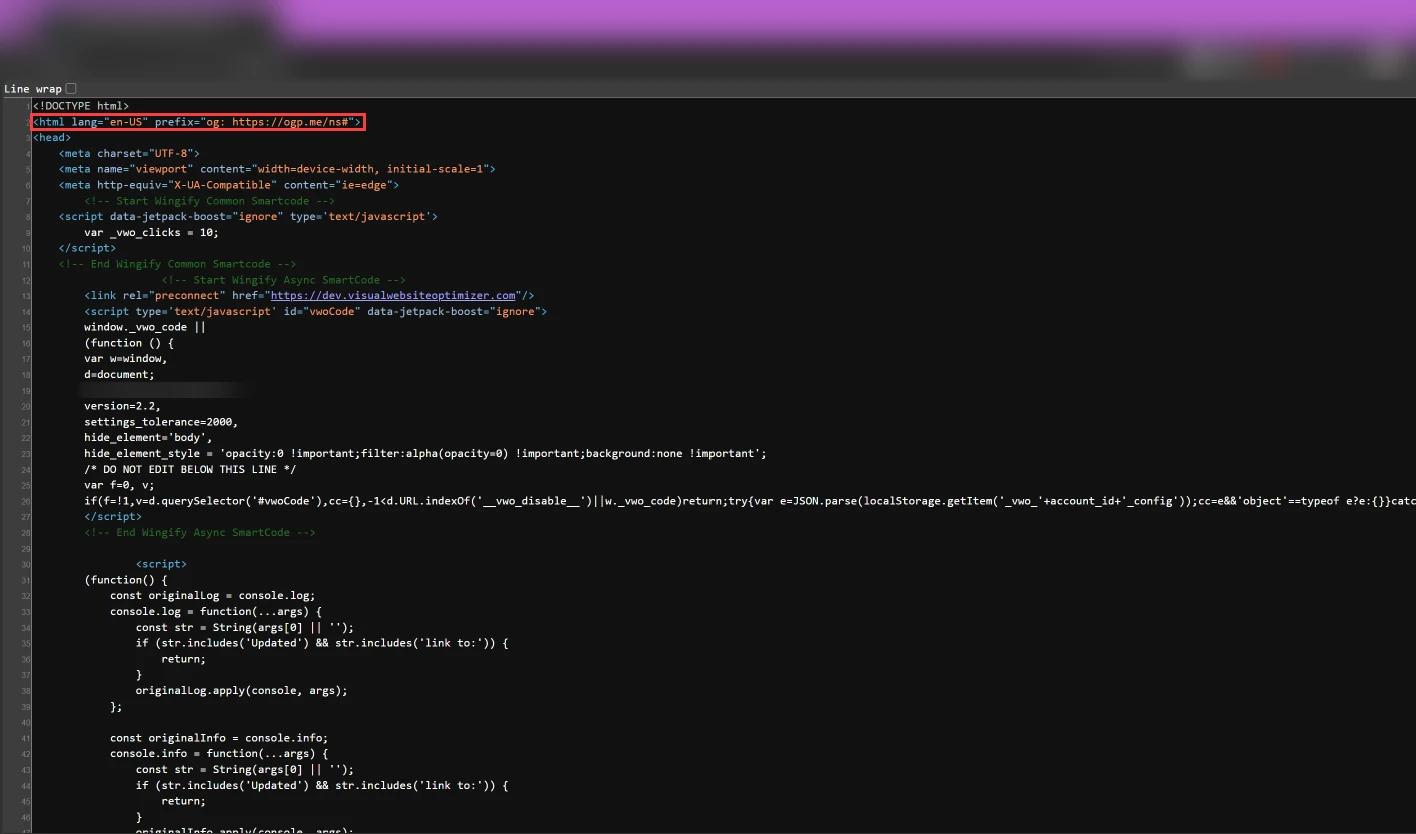
Search Console shows the result. Each report below is filtered to one country and excludes that country's own folder, so every row is a page ranking in the wrong market.
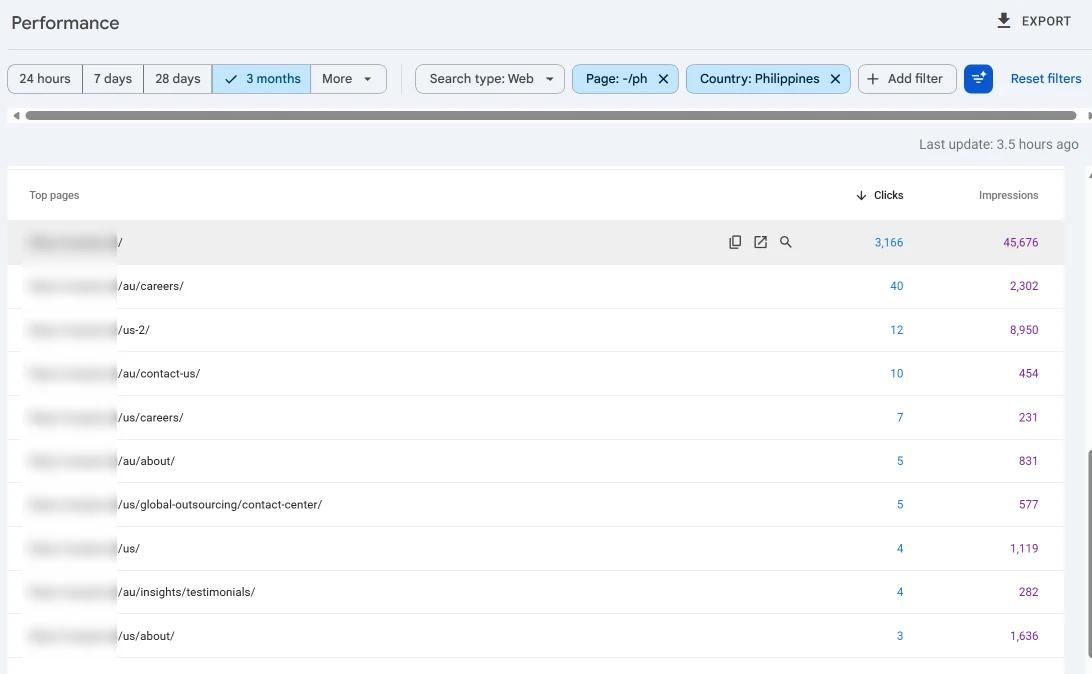
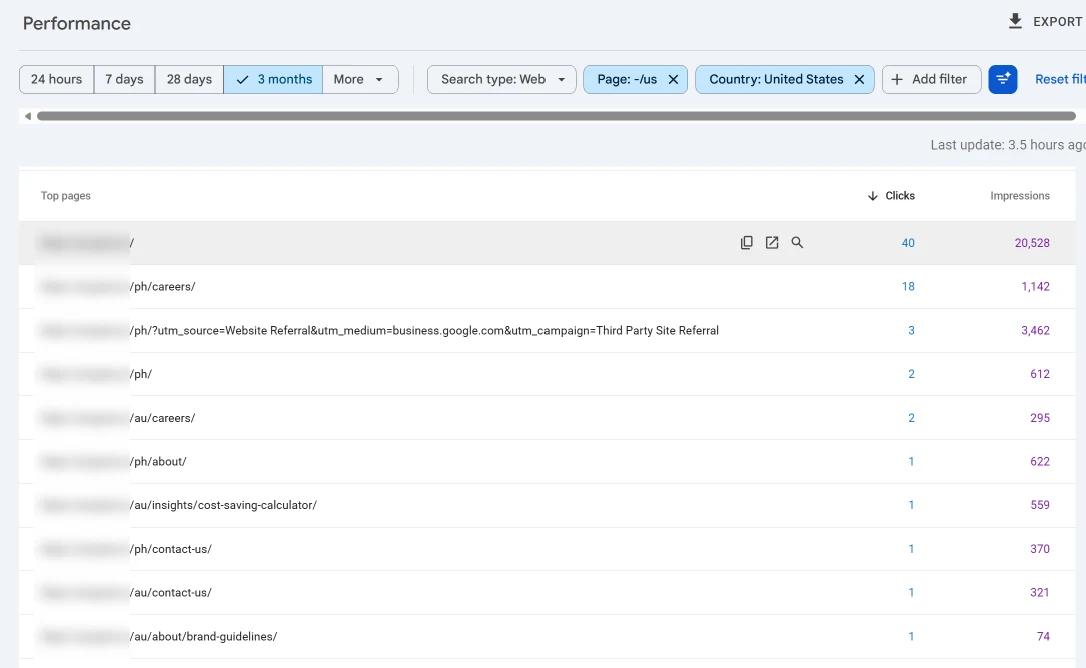
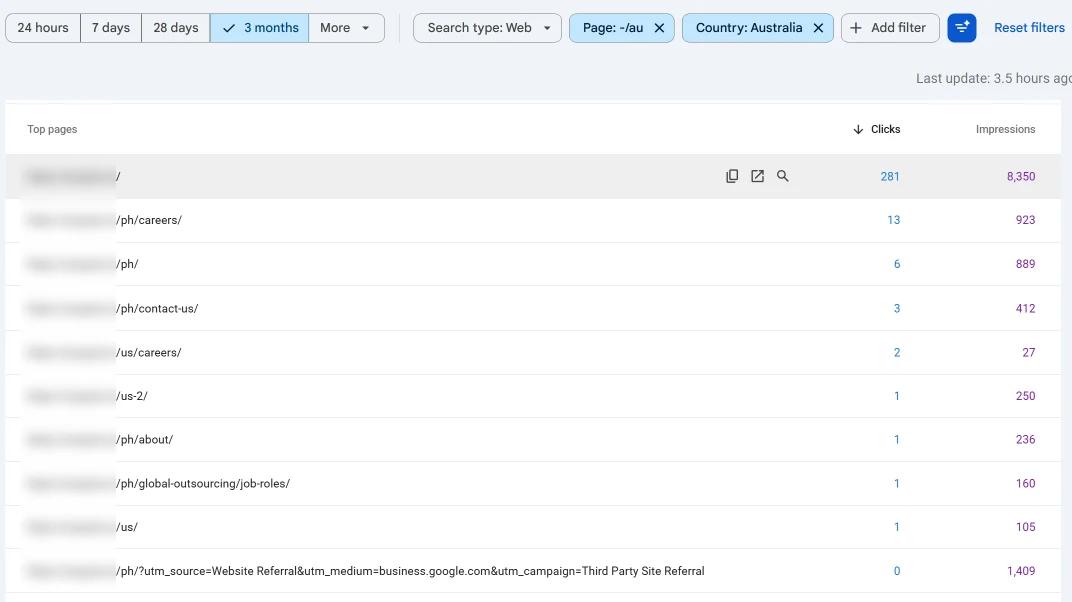
Every market loses some of its own traffic to another version of the same site. Broken hreflang produces the same pattern on a smaller scale: each missing return tag, redirected alternate or conflicting canonical disconnects a page from its cluster, and Google falls back to guessing. That is why fixes have to be verified across every localized page, not only the one that reported the error.
Hreflang Errors FAQ
Why are my hreflang tags not working?
The most common cause is a return tag that does not match exactly. Check that every page in the cluster lists the same URLs, character for character, and that each URL returns a 200 status and is canonical.
Is x-default required?
No. Google recommends it when you have a fallback page, such as a language selector or global homepage, but a cluster without x-default can still work.
Do I need a self-referencing hreflang tag?
Google's documentation says each version should list itself, and it is best practice. Google often tolerates a missing self-reference, so treat it as a lower priority than missing return tags.
Why does Google show the wrong language version?
Usually because hreflang is missing, a canonical conflicts with it, an alternate URL redirects, or same-language regional pages look like duplicates. Start with Steps 3 and 4.
How often should I run a hreflang audit?
After every deployment that touches templates, URLs or translations, plus a scheduled monthly crawl for large multilingual sites.